QuakeWatch Server Manual
(for
Version 2.0)
Introduction
The QuakeWatch Information
Distribution System (QWIDS) provides an end-to-end implementation for
reliable XML-based messaging. Its features include
multi-platform support, a high level of configurability, persistent
archiving of messages, and missed-message tracking/recovery.
QWIDS was developed as a next-generation earthquake notification
system to alert users, in near real-time, of seismic data and vital
earthquake-hazards information following significant events.
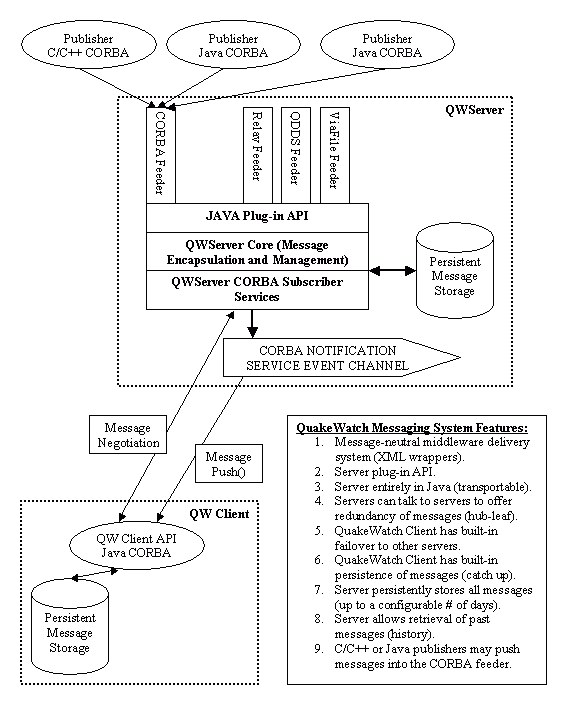
The QuakeWatch server operates as a "hub",
receiving messages from one or more sources and passing them on to
any number of QuakeWatch-client applications. It receives its
data from configurable "feeder" modules.
The messages are then passed along to QuakeWatch
clients via a Notification Service
CORBA-event-channel. The QuakeWatch server provides support
for resending requested messages, allowing clients to catch-up on
missed messages.
The QuakeWatch server is
written entirely in Java, allowing it to run on all major operating
systems and hardware. The messaging system uses a leading
open-source version of the industry-standard Common Object Request
Broker Architecture (CORBA).
Notification Service /
CORBA-Event-Channel
Messages are delivered
from the QuakeWatch server to its clients using a Notification
Service CORBA-event-channel. The CORBA-event-channel provides a
"one to many" relationship, allowing the server to service many
clients without degrading its performance. A QuakeWatch client
program first establishes a connection to the QuakeWatch server, and
then the server provides the client with the location of the
CORBA-event-channel.
New messages are
"pushed" to the client via the CORBA-event-channel. QuakeWatch
clients also "check in" with the QWServer by calling a
connection-status CORBA method on a periodic basis, and clients may
request previously-sent messages from the QWServer. See the "QuakeWatch Messaging System Diagram" for a
visual representation of the system.
The Notification Service executes as a
separate program from the QuakeWatch server (see the "Running QWServer" section for more information on
startup). When the server starts up, it finds the Notification
Service and creates a CORBA-event-channel for sending messages, and
stores a locator for the
CORBA-event-channel in a local file (whose name
is specified via the 'mainEvtChLocFile'
configuration parameter.) If the created CORBA-event-channel
is still available the next time the server starts up then it will be
reused.
Installing QWServer
The QuakeWatch server
distribution is available in archived form as a ".zip" file.
The following files and directories should be present after the
archive is unpacked:
QWServer.jar - Java archive file
containing the classes for the QuakeWatch server program.
ISTINotifServer.jar - Java archive file
containing the classes for the CORBA-event-channel program.
startQWS - Unix script for launching the
QuakeWatch server program.
stopQWS - Unix script for terminating the
QuakeWatch server program.
runQWS.bat - Windows batch file for
launching the QuakeWatch server program.
startNotif - Unix script for launching
the CORBA-event-channel server program.
stopNotif - Unix script for terminating
the CORBA-event-channel server program.
runNotif.bat - Windows batch file for
launching the CORBA-event-channel server program.
startAll - Unix script for launching both
programs.
startAllNum - Unix script for launching
both programs, using IP number instead of host name.
stopAll - Unix script for terminating
both programs.
startStopAll - Unix script for launching
or terminating both programs.
startStopAllNum - Unix script for
launching
or terminating
both programs
, using IP number
.
runAll.bat - Window batch file for
launching both programs.
runAllNum.bat - Window batch file for
launching both programs
, using IP number instead of host name
.
runSender - Unix script for
launching the CorbaSenderTest utility.
runSender.bat - Windows batch file for
launching the CorbaSenderTest utility.
runCubeToQuakeML - Unix script for launching the CubeToQuakeML
test utility.
runCubeToQuakeML.bat - Windows batch file
for launching the CubeToQuakeML test utility.
runCubeToAnssEQXML - Unix script for
launching the CubeToAnssEQXML test utility.
runCubeToAnssEQXML.bat - Windows batch
file for launching the CubeToAnssEQXML test utility.
runCubeToQWXML - Unix script for
launching the CubeToQWXML test utility.
runCubeToQWXML.bat - Windows batch file
for launching the CubeToQWXML test utility.
conf/QWServerConfig.xml - A sample
configuration file for the QuakeWatch server.
conf/QWServerConfig_qdds.xml - An
alternate configuration file, setup to use QDDSFeeder.
conf/QWServerConfig_qddsanns.xml - An
alternate config file, setup to use QddsAnssEQFeeder.
conf/QWServerConfig_qddsquakeml.xml - An
alternate config file, setup to use QddsQuakeMLFeeder.
conf/QWServerConfig_viafile.xml - An
alternate configuration file, setup to use QWViaFileFeeder.
conf/QWServerConfig_corba.xml - An
alternate configuration file, setup to use QWCorbaFeeder.
conf/QDDS.conf - Additional configuration
file for the QDDSFeeder module.
conf/QDDS_comm.lst - Hubs configuration
file for the QDDSFeeder module.
idl/QWFeeder.idl - CORBA method
specifications for the QWCorbaFeeder module.
doc/QWServer.html - The QuakeWatch server
manual.
doc/res - Resource files for the
QuakeWatch server manual.
doc/xml - Message format documentation
and example files.
test/ - Directory containing test
files for client-server login authorization.
Running QWServer/ Requirements
Use of the QuakeWatch
server requires that a Java Version Machine (JVM) version 1.8 or
higher be available on the host system.
The server
configuration file (including feeder modules) must be customized for
each installation. See the sections that follow for more
information.
Before running the
QuakeWatch server, the Notification Service (CORBA-event-channel)
program must be started. The Notification
Service
(CORBA-event-channel) program may be started via the startNotif
script (Unix) or runNotif.bat batch file (Windows). The
QuakeWatch server program may be started via the startQWS
script (Unix) or runQWS.bat batch file (Windows). Both
programs may be launched with a single command via the startAll
script (Unix) or runAll.bat batch file (Windows). T
he startAllNum script (Unix)
or runAllNum.bat batch file (Windows)
may be used to launch both programs with numeric-IP use enabled (see
the 'publishNumericIPFlag'
parameter description for more information). These script and
batch files must be run from the directory where the QuakeWatch
server program was installed.
Under Unix, the
Notification Service (CORBA-event-channel)
program may be terminated via the stopNotif script, the
QuakeWatch server program may be terminated via the stopQWS
script, and both
programs may be terminated with a single
command via the stopAll script. (Note that the "start"
and "stop" scripts may need to be made executable via the "chmod"
command.)
Under Unix, both programs may be launched or
terminated via the startStopAll script by giving it the
parameter value 'start' or 'stop'. The startStopAllNum
script operates in the same way except with
numeric-IP use enabled (see the 'publishNumericIPFlag' parameter
description for more information). If
the startStopAll or startStopAllNum
script is not
run from the directory where the QuakeWatch
server program was installed then the environment variable
"QWSERVERDIR" should be set to the location where the QuakeWatch
server program was installed.
The process-ID of the programs may be
determined by using a command like "ps -Afwwu uname |
grep java", where "uname" is the user-name that the programs were
run under.
The "start" scripts that start up the servers
create ".pid" files that contain the process-ID numbers for the
processes. These files are used when terminating the servers
via the "stop" scripts.
Under Windows, the programs
will each run in a console window. Selecting the console window
and hitting "Ctrl-C" will terminate the program.
The Notification
Service (CORBA-event-channel) program may be configured to run at a
port number other than the default (39988) by inserting the "-p=###"
parameter into the launch command for the program (i.e., 'java
-Xms16m -Xmx256m -jar ISTINotifServer.jar -g=1 -p=31988
&'). It may be configured to run at
a specified host address by inserting the "-a=address" parameter into
the launch command for the program (i.e., 'java -Xms16m -Xmx256m -jar
ISTINotifServer.jar -g=1 -a="131.215.220.4" &'). An
effective way of doing this for a given installation is to edit the
'startNotif' script (Unix) or 'runNotif.bat' batch file (Windows).
The Notification
Service program may use a configuration file, with the default name
"NotificationServer.ini".
An alternate location and/or name for the
configuration file may be specified by supplying "-c" as the first
command-line parameter and the path/file name for the configuration
file as the second command-line parameter to the program. A
valid configuration file will contain lines of 'name=value' entries,
and the '#' character may be used to insert comments. When any entry
in the file is changed, the program must be restarted for the change
to take effect. To see a list of available settings for the
configuration file, execute the program with the command-line
parameter "-h" (i.e., "runNotif -h"). A sample configuration
file could contain the following:
# Port number for notification server:
serverPortNumber =
31988
# Host address for notification server:
serverHostAddress = 131.215.220.4
Server Configuration File
The QWServerConfig.xml
file (found in the "conf" directory) contains the configuration
parameters for the QuakeWatch server. See the "Example QuakeWatch Server Configuration
File" section for a sample file. An alternate location and/or
name for the server configuration file may be specified by supplying
"--configFile" as the first command-line parameter and the path/file
name for the configuration file as the second command-line parameter
to the program.
When any parameter in the configuration
file is changed, the server must be restarted for the change to take
effect.
The
configuration file is in XML format, with all of the information
inside of a "<QWServerConfig>" element. The main
configuration parameters for the server reside inside of the
"<Settings>" element, and are described below.
See the "QuakeWatch
Feeder Modules"
section for details on the QWFeederMod
element that is used to configure the QuakeWatch server feeder
modules.
serverIdName
= "name"
The ID name string for
the server. This server-ID name should uniquely identify the
server installation. The name will be passed along to clients
connecting to the server.
serverPortNum
= ##
The port number specification
for the server. Clients connecting to the server will specify
this port address. If this parameter is not specified then the
port address will default to 39977. Note that if the specified
port value is less than 1024 then special operating-system
administrator privileges may be required to run the server.
notifSvcPortNum
= ##
An
optional port number specification for the Notification Service
(CORBA-event-channel) that determines where the server will expect to
find the Notification Service program. If the Notification
Service has been configured to run at a port number other that the
default (39988), then this parameter must be set to the port number
value. If this parameter is not
specified then the value will default to 39988. If this
parameter is set to 0 then the server will not use a CORBA-event-channel. To configure the Notification Service program to run at a port number other than the
default (39988), the "-p=##" parameter is inserted into the launch
command for the program (i.e. "java -Xms16m -Xmx256m -jar
ISTINotifServer.jar -g=1 -p=38988 &").
altServerIdsList
= "hostAddr:port,hostAddr:port,..."
The
list of alternate server-IDs to be passed along to clients connecting
to the server. If a client connected to the server detects a
loss of connectivity, the client will attempt to connect to the
servers on the list. Each item in the list contains a host
address in name (i.e. "www.caltech.edu") or
numeric-IP (i.e. "131.215.220.4") form, followed by a numeric port-address value; with
the items separated by commas. If this parameter is not
specified then no alternate server-IDs are
used.
allowDuplicatesFlag
= true/false
Configures whether the
server will accept or reject duplicate messages. The
combination of this and the 'checkDupFdrSourceFlag' parameter are
used to configure how the server handles duplicate messages, where a
duplicate message is one whose payload (in the "DataMessage" element)
matches that of a previously-received message in the server's
cache. See the table below for details. If
this parameter is not specified then the value will default to
'false'.
allowDuplicatesFlag
|
checkDupFdrSourceFlag
|
Configured Behavior
|
false
|
true
|
Messages are rejected as duplicates if the
payload matches that of a previous message or if the
feeder-data-source host-name and message-number values match those
of a previous message [default]
|
false
|
false
|
Messages are rejected as duplicates if the
payload matches that of a previous message (regardless of
feeder-data-source host-name and message-number values)
|
true
|
true
|
Messages are only rejected as duplicates if
the feeder-data-source host-name and message-number values are
supplied and match (regardless of payload)
|
true
|
false
|
Messages are never rejected as duplicates
|
checkDupFdrSourceFlag
=
true/false
Configures whether
the server will check feeder-data-source
host-name and message-number values when detecting duplicate
messages. The combination of this and the 'allowDuplicatesFlag'
parameter are used to configure how the server handles
duplicate messages. See the
'allowDuplicatesFlag'
parameter description for more
information. If this parameter is not specified then the value
will default to 'true'.
serverLogFileName
= "logFileName"
The name of the log
file to be written to by the server. A date code in the form
"_yyyymmdd" will be inserted into the name, and a new log file name
will be used each day. If this parameter is not specified then
the log file name will default to "log/QWServer_yyyymmdd.log".
serverLogFileLevel =
"level"
The message level for log
file output. The allowed values are "NO_MSGS", "Error",
"Warning", "Info", "Debug", "Debug2", "Debug3", "Debug4", "Debug5" and
"ALL_MSGS". If this parameter is not specified then the value
will default to "Debug".
serverConsoleLevel = "level"
The message level for
console output. The allowed values are "NO_MSGS", "Error",
"Warning", "Info", "Debug", "Debug2", "Debug3", "Debug4", "Debug5" and
"ALL_MSGS". If this parameter is not specified then the value
will default to "Info".
logFilesMaxAgeInDays
= ##
The maximum age, in days, for
log files generated by the server. Log files older than this
value will be automatically deleted; unless the value is zero, in
which case the log files will never be deleted. If this
parameter is not specified then the value will default to 30 days.
archiveDirNameStr
= "dirName"
The name of the
directory used for storing event-message archive files. If this
parameter is not specified then the directory name "storage" will be
used.
archiveFileNameStr
= "name"
The base file name used
for generating archive file names.
A date code in the form "_yyyymmdd" will be
inserted into the name, and a new archive file name will be used each
day. If this parameter is not specified then the base file name
"QWEvents_yyyymmdd.txt" will be used.
maxArchiveAgeInDays = ##
The maximum age, in
days, for event-message archive files generated by the server.
Archive files older than this value will be automatically deleted;
unless the value is zero, in which case the archive files will never
be deleted. This parameter may be specified as a floating point
value (such as 1.5 days). If this parameter is not specified
then the value will default to 30.0 days.
maxCacheAgeInDays = ##
The age, in
days, for the event-message memory cache.
This parameter may be specified as a floating
point value (such as 1.5 days).
If this parameter is not specified then the
value will default to 15 days.
cacheMaxObjectCount = ##
The
maximum number of messages allowed to reside in the cache. When
the number of messages in the cache is greater than or equal to this
parameter and a new message arrives, the oldest message in the cache
is removed. If this parameter is set to zero then no maximum is
enforced.
If this parameter is not specified then the
value will default to 0 (no limit).
cacheMaxTotalDataSize = ##
The
total-data-size limit (in bytes) for the cache.
When the total data size for the messages in the
cache is greater than or equal to this limit and a new message arrives
, the oldest messages in the cache are removed
until the total data size is under the limit. If the prospect of
the cache data-size getting too large is a concern, the recommended
setting for this parameter is 40% of the available memory-heap size
(setup via the "-Xmx" argument on the 'java' launch command). If
this parameter is set to zero then no limit is enforced.
If this parameter is not specified then the
value will default to 0 (no limit).
maxResendNumMsgs
= ##
Specifies the maximum number
of messages that may be sent per resend-request to a client.
This limit value is used to divide a single, large client
resend-request into several smaller ones, which improves the
robustness of the communications. If this parameter is not
specified then the value will default to 50 messages.
maxResendAgeInDays = ##
Specifies the maximum
age of messages that may be sent via a resend request to a
client.
This parameter may be specified as a floating
point value (such as 1.5 days).
If this parameter is not specified then the
value will default to 15.0 days.
connWaitRetrySecs
= ##
Specifies the maximum number
of seconds, at program startup, that the server should wait for the
Notification Service (CORBA-event-channel) to become ready before
aborting.
If this parameter is not specified then the
value will default to 15 seconds.
serverHostAddress
= "hostAddress"
An optional host
address specification for the server. The address may be in name
(i.e. "www.caltech.edu") or numeric-IP
(i.e. "131.215.220.4")
form. This parameter is usually not
needed, except in cases where the machine hosting the server has more
than one IP address and a certain address should be used by the
server. If this parameter is not specified or is set to an empty
string then the host name and IP address of the machine hosting the
server are automatically determined.
T
he Notification Service (
CORBA-event-channel) program may also be
configured to run at a specified host address by inserting the
"-a=address" parameter into the launch command for the program (i.e.
'java -Xms16m -Xmx256m -jar ISTINotifServer.jar -g=1 -a="
131.215.220.4
" &').
publishNumericIPFlag
= true/false
Configures whether the
server will use a numeric IP instead of a host name when generating
locator strings for client connections. In most installations,
the host name is the preferred address for the machine. In
installations where the machine's host name is not valid for all
client connections, the numeric IP may be needed. Note that if
the 'serverHostAddress' parameter is specified then this parameter
will have no effect.
If this parameter is not specified then the
value will default to 'false'
(host name used)
. The Notification Service (
CORBA-event-channel) program supports a similar
parameter ("-publishNumericIPFlag" or "-n"), and both programs may be
launched with numeric-IP use enabled via the "startAllNum" script
(Unix) or "runAllNum.bat" batch file (Windows).
notifSvcHostAddress
= "hostAddress"
An optional host
address specification for the Notification Service
(CORBA-event-channel) program. The address may be in name (i.e.
"www.caltech.edu") or numeric-IP
(i.e. "131.215.220.4")
form. This parameter is usually not
needed, except in cases where the host address for the Notification
Service is different from the default host address for the
server. If this parameter is not specified or is set to an empty
string then the server will attempt to find the Notification Service
on the same machine.
The Notification Service
(CORBA-event-channel) program may be configured to run at a specified
host address by inserting the "-a=address" parameter into the launch
command for the program (i.e. 'java -Xms16m -Xmx256m -jar
ISTINotifServer.jar -g=1 -a="131.215.220.4" &').
maximumMessageSize
= ###
Specifies the
maximum-allowed size (in bytes) for messages entering the
server. When a message (received via a feeder module) is larger
than the specified size it is not stored and is not fowarded, and a
log message is generated.
If this parameter is not specified then the
value will default to 65536
.
clientsInfoLogIntervalSecs
= ##
If this parameter is
greater than zero then a log file of information on connected clients
will be generated, with its value specifying the clients-list-update
output interval in seconds. Its name will be in the form
"log/QWServerClientsInfo_yyyymmdd.log".
If this parameter is
set to zero
then the file will not be generated.
If this parameter is not specified then the
value will default to
600 seconds.
clientsInfoLogMaxAgeDays
= ##
The
maximum age, in days, for
the clients-information-log files enabled by the
"clientsInfoLogIntervalSecs" parameter.
Clients-information
-log
files older than this value will be
automatically deleted; unless the value is zero, in which case the
files will never be deleted. If this parameter is not specified
then the value will default to 180 days.
clientsInfoLogSwitchDays = ##
The switch interval, in
days, to be used for the
clients-information
-log files enabled by the "
clientsInfo
LogIntervalSecs" parameter. After the
given number of days, the current log file is closed and a new one is
started. If this parameter is not specified then the value will
default to 7 days.
messageLogFileName = "name"
An
optional specification for a log file of messages that have been
received and sent to clients.
A date code in the form "_yyyymmdd" will be
inserted into the name. If this parameter is not specified
or is set to an empty string
then the file will not be generated.
messageLogSwitchDays
= ##
The switch interval, in days,
to be used for the message-log files specified by the
"messageLogFileName" parameter. After the given number of days,
the current log file is closed and a new one is started. If this
parameter is not specified then the value will default to 7 days.
consoleRedirectFileName
= "fileName"
An optional specification
for the console-output redirect file name. A date code in the
form "_yyyymmdd" will be inserted into the name, i.e.,
"QWServerConsole_yyyymmdd.txt". If this parameter is not
specified then the console output will not be redirected. The
use a of console-output redirect file is highly recommended so that
unexpected error messages will be captured and saved (i.e.,
out-of-memory error messages).
consoleFilesSwitchIntvlDays
= ##
The switch interval, in days,
to be used for the console-output redirect files specified by the
"consoleRedirectFileName" parameter. After the given number of
days, the current redirect file is closed and a new one is started;
unless the value is zero, in which case the initial redirect file is
used indefinitely. If this parameter is not specified then the
value will default to 90 days.
consoleFilesMaxAgeInDays
= ##
The maximum age, in days, for
the console-output redirect files specified by the
"consoleRedirectFileName" parameter. Redirect files older than
this value will be automatically deleted; unless the value is zero, in
which case the redirect files will never be deleted. If this
parameter is not specified then the value will default to 1096 days (3
years).
Additional Server Configuration
Parameters
This section
describes additional administrative
parameters for the server that reside inside of
the "<Settings>" element of the server configuration file.
A full listing of QWServer parameters may be generated by executing
the program with the "-h" parameter (i.e., "java -jar QWServer.jar
-h").
clientVersionsInfoFile = "URL-path"
The path and file name for the
client-versions-information file. This XML-format file
configures the available upgrades that are to be offered to client
programs. Upgrades for several types of client programs may be
configured, with each type having its own "DistribName". See the
"Example Client-Versions-Information
File" section for a sample of this file's contents. The
'clientVersionsInfoFile' parameter may specify a local file or a URL
to a remote file.
If this parameter is not specified then it will
default to an empty string (no file).
The server will poll the
client-versions-information
file and will automatically reload its contents
if the file is modified. The delay time between polls is
specified by the 'clientVInfoPollDelaySecs' parameter.
clientVInfoPollDelaySecs = ##
The number of seconds to delay between polls
of the client-versions-information file.
The server will automatically reload the
contents of the
client-versions-information file
if the file is modified.
If this parameter is not specified then it will
default to 3600 seconds.
rejectUnknownDistFlag = true/false
Configures whether the server will allow a
client to connect when its distribution name does not match a
"DistribName" entry configured in the
client-versions-information file (see the
'clientVersionsInfoFile' parameter above). If this parameter is
set to 'true' and the client's distribution name does not match then
the client connection will be rejected. If a
client-versions-information file is not setup
then this parameter will have no effect. If this parameter is
not specified then it will default to 'false'.
redirectServersList
= "
hostAddr:port,hostAddr:port,...
"
A
list of one or more server-redirect
locators. Each item in the list contains a host address
in name (i.e. "www.caltech.edu") or numeric-IP
(i.e. "131.215.220.4")
form, followed by a numeric port-address value;
with the items separated by commas.
Depending on the other "redirect"
parameters described below, connecting clients may be redirected to
the specified servers.
If more than one redirect server is used
then the client will connect to the first one and use the rest as
alternate servers. If this parameter is not specified then no
redirect
servers are used
.
randomizeRedirListFlag
= true/false
Configures whether
or not the list of redirect servers specified via the
'redirectServersList' parameter will be randomized each time it is
given to a connecting client. If the
'redirectServersList' parameter contains less
than two items then this parameter will have no effect. If this
parameter is not specified then the value will default to 'true'
(redirect servers randomized)
.
redirectConnectsCount
= ##
The number of
clients that need to be connected before newly-connecting clients are
redirected to the servers specified by the
'redirectServersList' parameter. If the
'redirectServersList' parameter is empty then no
clients will be redirected. Setting this parameter to zero
specifies that all clients should be redirected. If this
parameter is not specified then it will default to 0 (all clients
redirected)
.
redirectPercentValue
= ##
The percentage of
client connections that should be redirected
to the servers specified by the
'redirectServersList' parameter. If the
'redirectServersList' parameter is empty then no
clients will be redirected. This parameter is specified as an
integer from 0 to 100. If both the 'redirectConnectsCount'
parameter and this parameter are specified then the
'redirectConnectsCount' parameter will first be used to determine if
the newly-connecting client is eligible for redirection, and then this
parameter will be applied.
If this parameter is not specified then it will
default to 100 (all clients redirected)
.
qwServicesAvailFlag
= true/false
Configures whether the
server's CORBA QWServices are initialized and used.
This parameter is usually not modified.
If this parameter is not specified then the
value will default to 'true'
(QWServices used)
.
systemExitOnCloseFlag
= true/false
Configures whether the
server will perform "System.exit()" at the end of its close-program
procedure. In some configurations (like web services) it is
desirable to set this flag to 'false' to prevent
"System.exit()" from being performed.
If this parameter is not specified then the
value will default to 'true'
(
"System.exit()"
performed on close)
.
allowObsLoginClientsFlag
= true/false
Configures whether the
server will accept connections from "obsolete-login" clients
(older-version clients that do not support login username/password
configuration). If this parameter is 'true' and a
password-database is setup (via the parameters described in the "Password Database Configuration Parameters"
section) then connections from
"obsolete-login" clients will always be allowed,
while connections from clients that supply a login username and
password will need be successfully verified before being
allowed. This parameter is used to ease the transition away from
"obsolete-login" clients, and should not
otherwise be used.
If this parameter is not specified then the
value will default to 'false'
(
"obsolete-login" clients rejected
)
.
checkFdrStatusErrMins
= ##
This parameter specifies how
often (in minutes) the feeder modules are checked to see if they are
reporting status-error messages. (The QWRelayFeeder flags a
status-error message if it is not receiving 'alive' messages from its
source server.) When a feeder-status-error message is detected,
a warning message is logged. This parameter may be specified as
a floating point value (such as 1.5 minutes). If set to zero
then the feeder-status-error messages are not checked. If this
parameter is not specified then the value will default to 15.0
minutes.
threadLogIntervalMSecs
= ##
If this parameter is greater
than zero then a log file of program "thread" information will be
generated, with its value specifying the check-and-output interval in
milliseconds. This log file is used for debugging
purposes. Its name will be in the form
"log/QWServerThreads_yyyymmdd.log".
If this parameter is not specified
or is set to zero
then the file will not be generated.
memoryLogIntervalMSecs
= ##
If this parameter is
greater than zero then a log file of program memory information will
be generated, with its value specifying the check-and-output interval
in milliseconds. This log file is used for debugging
purposes. Its name will be in the form
"log/QWServerMemInfo_yyyymmdd.log".
If this parameter is not specified
or is set to zero
then the file will not be generated.
memoryLogMaxAgeInDays
= ##
The maximum age, in days, for
the memory-log files enabled by the
"memoryLogIntervalMSecs" parameter.
Memory-log
files older than this value will be
automatically deleted; unless the value is zero, in which case the
files will never be deleted. If this parameter is not specified
then the value will default to 180 days.
memoryLogSwitchDays = ##
The switch interval, in
days, to be used for the memory-log files enabled by the
"memoryLogIntervalMSecs" parameter. After the given number of
days, the current log file is closed and a new one is started.
If this parameter is not specified then the value will default to 30
days.
statsLogIntervalSecs = ##
The number of seconds
between each output of server-statistics information to the log
file. Included in the output is information on feeder modules,
message cache, and currently-connected clients. If this
parameter is set to 0 then no
server-statistics information will be
generated.
If this parameter is not specified then the
value will default to 3600 seconds.
memorySizeWarnMBytes = ##
The in-use-memory-size
limit (in megabytes) beyond which warning messages will be
logged. When the program detects that its in-use memory is
larger than this value, the program will send warning messages to its
log file. If this parameter is not specified then the value will
default to 100 MB.
threadCountWarnMargin = ##
The margin value added
to the thread-count limit beyond which warning messages will be
logged. When the program detects that its thread count is larger
than an internally-determined limit plus this margin value, the
program will send warning messages to its log file. If this
parameter is not specified then the value will default to 25.
notifSvrStatusLogName = "filename"
The name of the Notification Service status
log file to be checked for in-use-memory-size and thread-count
limits. A date code (in the form "_YYYYMMDD") for the current
date is inserted into the specified name when it is used to locate the
file. When this program detects that the Notification Service
memory size or thread count is too large, the program will send
warning messages to its log file. (The 'memorySizeWarnMBytes'
and 'threadCountWarnMargin' parameters are used in the
determination.) If this parameter is set to an empty string ("")
then the program will not attempt to check for the status log
file. If this parameter is not specified then the value will
default to "log/NotifServerStatus.log".
notifSvrStatusWarnFlag
= true/false
Set 'true' to
configure the program to log warning messages if the
'notifSvrStatusLogName' parameter specifies a Notification Service
status log file and the program is unable to fetch status-log entries
from the file. If this parameter is not specified then the value
will default to 'false'.
defaultFdrSourceHost = "name"
Configures the QWServer
to have a "default" feeder-data-source "host name" value such that any
received messages that do not already contain a
feeder-data-source-host-name value will be given the default value and
a feeder-data-source message number. This parameter should only
be used on QWServer installations that are dedicated to a single data
source. See the "Feeder-Data-Source
Message Tracking System" section for more information.
If this parameter is not specified then the
value will default to
an empty string (no default host name).
feederModulesCfgFile
= "fileName"
Specifies the dynamic
feeder-modules configuration file, which contains one or more
"<QWFeederMod>" elements for feeders that are to be used in
addition to the ones specified in the "main" server configuration
file. The server monitors this file and stops/starts feeders
according to its content. This can be useful for "hub" servers
where the data-provider feeders may want to be changed without
stopping and restarting the server.
The content of the
feeder-modules configuration file is in XML
format. Each feeder is specified using a "<QWFeederMod>"
element, with all the
"<QWFeederMod>" elements inside of a
single "<QWFeederConfig>" element. The syntax of the
"<QWFeederMod>" element is the same as in
the "main" server configuration file.
See the "Example
Feeder-Modules Configuration File" section for a sample file, and the
"QuakeWatch Feeder Modules" section for
information on feeder settings. (Note that the 'QDDS' feeder
cannot be stopped and restarted.)
If this parameter is not specified then the
value will default to
an empty string (no
dynamic feeder-modules configuration file
).
checkEQMsgIdentFlag
= true/false
Configures whether or
not the server will check for and use the following message elements:
ANSS-EQ-XML message format:
'DataMessage'|'EQMessage'|'MsgSrc' => feeder-data-source host name
'DataMessage'|'EQMessage'|'MsgIdent'
=> feeder-data-source message number
QuakeML message format:
'DataMessage'|'quakeMessage'|'msgSrc' => feeder-data-source host
name
'DataMessage'|'quakeMessage'|'msgIdent'
=> feeder-data-source message number
If this parameter is 'true' and the
'MsgSrc' and 'MsgIdent' child-elements are found
then their values are used as the feeder-data-source "host name" and
message-number values for the given message. This allows these
values to be specified within the message data. See the "Feeder-Data-Source Message Tracking System"
section for more information. If this parameter is not specified
then the value will default to 'true'.
msgKeyElement1Name
= "elementName"
Sets the name of
the upper child-element under the 'DataMessage' element to be used
when generating check-duplicate key strings for messages. When a
check-duplicate key string is generated, if the 'DataMessage' element
contains a child-element matching the 'msgKeyElement1Name' value, and
the child-element contains a child-element matching the
'msgKeyElement2Name' value, then that child-element is used for the
key string. If only the 'msgKeyElement1Name' value is given then
its matching child-element will be used.
If this parameter is not specified then
the value will default to "EQMessage" (for duplicate-checking of
ANSS-EQ-XML-format messages)
.
msgKeyElement2Name
= "elementName"
Sets the name of
the lower child-element under the 'DataMessage' element to be used
when generating check-duplicate key strings for messages. When a
check-duplicate key string is generated, if the 'DataMessage' element
contains a child-element matching the 'msgKeyElement1Name' value, and
the child-element contains a child-element matching the
'msgKeyElement2Name' value, then that child-element is used for the
key string.
If this parameter is not specified then
the value will default to "Event" (for duplicate-checking of
ANSS-EQ-XML-format messages)
.
coaFile
= "URL-path"
The location of the
"Certificate of Authority" file for the server. See the "Message Signing Implementation" section for
more information.
crlFile
= "URL-path"
The location of the
"Certificate Revocation List" file for the server. See the "Message Signing Implementation" section for
more information.
certFile = "file-path"
The location of the "Certificate" file for
the server. See the "Message Signing
Implementation" section for more information.
privKeyFile
= "URL-path"
The location of the
"private key" file for the server. See the "Message Signing Implementation" section for
more information.
mainEvtChLocFile
= "fileName"
An optional specification
for the CORBA-event-channel locator file name. The purpose of
this file is to allow the QWServer to reuse a CORBA-event-channel in
cases where the QWServer is restarted but the Notification Service
CORBA-event-channel is not. If this parameter is not specified
then the value will default to "MainMessageService.loc".
Status Report Configuration Parameters
The QWServer may be
configured to generate and deliver status reports containing
information about the server's operation, errors and connected
clients. The status reports may be written to a log file, made
available via the client-services connection, and/or sent to a remote
machine (via 'scp' copy). The configuration parameters for
doing this are described below.
stRptItvlMins = ##
Sets the
status-report interval, in minutes. For any status-report data
to be generated, this parameter must be set to a value greater than
zero. This parameter may be specified as a floating point value
(such as 1.5 minutes). If this parameter is not specified then
the value will default to 0.0 (no reports generated).
stRptTrkLogLevel = "level"
Sets the minimum tracking log level for
status reports. Server log messages that are at this level or
greater will be entered into the reports. For example, if this
parameter were set to "Info" then log messages at the "Info" and
"Warning" levels would be entered. If this parameter is not
specified then the value will default to "Warning".
stRptTrkLogCount = ##
Sets the maximum number of tracked log
messages that will be retained for status reports. When more
than this number of tracked log messages occur, older messages will
be discarded. If this parameter is not specified then the value
will default to 10.
stRptTrkLogHours
= ##
Sets the maximum age (in
hours) for tracked log messages to be retained for status
reports. When the age of a tracked log messages becomes older
that this value, it is discarded. If this parameter is not
specified then the value will default to 24 hours.
stRptOnLogFlag = true/false
If this parameter is set to 'true' then a
status report will be generated immediately whenever a tracked log
message is entered. If this parameter is not specified then the
value will default to 'true'.
stRptClientsFlag = true/false
If this parameter is set to 'true' then a
list of currently-connected clients will be included in generated
status reports. If this parameter is not specified then the
value will default to 'true'.
stRptClientQueriesFlag = true/false
Setting this parameter to 'true' will enable
the querying of status reports via a client-services
connection. (This will allow the QWStatusProcessor program to
directly fetch status reports from the server.) If this
parameter is not specified then the value will default to 'true'.
stRptLocalFile = "filename"
Specifies the name of a local status-report
log file that will receive copies of generated status reports.
A date code in the form "_yyyymmdd" will be
inserted into the name, and a new log file will be used each
day. If this parameter is not specified
or is set to an empty string then no local
status-report log file will be generated.
stRptFilesMaxAge = ##
The maximum age, in days, for local status-report log files
generated by the server. Local
status-report log files older than this value
will be automatically deleted; unless the value is zero, in which
case the log files will never be deleted. If this parameter is
not specified then the value will default to 7 days.
stRptRemoteDir = "directory"
If generated status reports are to be
delivered as files to a remote machine via 'scp' then this parameter
must be set to the destination directory path. If
this parameter is not specified or is set to an empty string then
status reports will not be delivered as files
to a remote machine.
stRptRemoteFName = "filename"
If generated status reports are to be
delivered as files to a remote machine via 'scp' then this parameter
may be used to specify to the destination file name. If this parameter is not specified and status reports are delivered as files to a remote
machine then the file name will be
automatically generated using the 'serverIdName' parameter value. A current timestamp is added to the name on
each delivered file (to make each file name unique).
stRptRemoteHost =
"hostAddress"
If generated status
reports are to be delivered as files to a remote machine via 'scp'
then this parameter should be set to the host address of the remote
machine. If this parameter is not
specified then the value will default to an empty string ("").
stRptRemoteUser = "username"
If generated status reports are to be
delivered as files to a remote machine via 'scp' then this parameter
should be set to the username of an SSH login on the remote
machine. If this parameter is not
specified then the value will default to an empty string ("").
stRptRemAuthKeyFile =
"filename"
If generated status
reports are to be delivered as files to a remote machine via 'scp'
then this parameter should be set to the authorization keyfile for an
SSH login on the remote machine. If this
parameter is not specified then the filename will default to
".ssh/id_rsa" in the user-home directory.
stRptRemChkHostFlag =
true/false
If generated status
reports are to be delivered as files to a remote machine via 'scp'
then this parameter may be set 'true' to require that the host
address for the remote machine is listed among those in the
".ssh/known_hosts" file in the user-home directory on the local
machine. If this parameter is not
specified then the value will default to 'false' (all host addresses
accepted).
Password Database Configuration
Parameters
The QWServer may be
configured to use a "password database" to verify client-connection
login information. The password-data parameters for the server
reside inside of the "<Settings>" element
of the server configuration file, and are
described below. See the "Setting Up
a Slave MySQL Server for CISN Login" section for information on how
to configure the password database.
pwdDatabaseHostAddress
= "hostAddress"
The host address
specification for the machine hosting the client-login password
database. If the client-login password database is hosted on
the same machine as the QuakeWatch server then a value of "localhost"
should be used. If this parameter is not specified or is set to
an empty string then the value "localhost" will be used.
pwdDatabasePortNumber = "###"
The port number specification for the
machine hosting the client-login password database. The port
number is configured as part of the client-login password database
administration. If this parameter is not specified or is set to
an empty string then the value "3306" will be used.
pwdDatabaseIdentifier = "identifier"
The database-identifier string for the
client-login password database. The database identifier is
configured as part of the client-login password database
administration. If this parameter is not specified or is set to
an empty string then a client-login password database will not be
used by this QuakeWatch server.
pwdDatabaseUsername
= "username"
The database-access
username for the client-login password database. The username
is configured as part of the client-login password database
administration.
pwdDatabasePassword =
"password"
The database-access
password for the client-login password database. The password
is configured as part of the client-login password database
administration.
localPasswordFile
= "pathname"
The path and file
name for a local file containing client-login password
information. The file provides an alternate method of
specifying client-login information (instead of the database).
If both the local file and the database are configured then both will
be used and the entries in the local file will take precedence.
The file contains one line per client-login entry, with each line in
the format "username=encryptedPwd", where "encryptedPwd" is the
encrypted form of the password (using Unix-style crypt). The
following command may be used to create an encrypted password for use
in this file:
java -cp QWServer.jar com.isti.util.JCrypt username password
If the 'localPasswordFile'
parameter is not specified or is set to an empty string then a local
client-login password file will not be used by this QuakeWatch
server. A sample local-password file,
"test/TestLocalPwdFile.txt", is included with the QWServer
distribution.
QuakeWatch Feeder Modules
The QuakeWatch server
receives its messages from feeder modules, which are configured via
one or more "<QWFeederMod>" elements in the server
configuration file. They may also be specified in a dynamic
feeder-modules configuration file (see the "feederModulesCfgFile"
parameter).
These modules are available:
- The "QWRelayFeeder" receives its
messages from another QuakeWatch server.
- The "QWPdlFeeder" receives its
messages from a Product
Distribution Layer ('PDL') hub.
- The "QWViaFileFeeder" receives
messages via files placed into an "input" directory (similar to how
a QDDS "hub" operates).
- The "QWCorbaFeeder" receives messages
by way of a CORBA method.
- The "QDDSFeeder", "QddsAnssEQFeeder"
and "QddsQuakeMLFeeder" modules operate as a "leaf" on the QDDS
network, receiving and translating new event messages.
Note: If the "QWPdlFeeder" is used, a
copy of the "ProductClient.jar" file from the PDL
distribution must reside in the QWServer program directory.
Any number of "<QWFeederMod>"
elements may specified, and any combination of
feeder types may be included. The
following attributes of this element are common to all feeder
modules.
Name = "feederName"
The name
associated with the feeder module. The
QWRelay feeder is usually named "QWRelay" and the QDDS feeder is
usually named "QDDS".
Class = "feederClassSpec"
The Java class specification for the feeder
module. This is used to by the server to load the feeder
module. The following table shows the value used for each type
of feeder module. For example, a value of
"com.isti.quakewatch.server.QWRelayFeeder" would specify the
'QWRelay' feeder module.
| QWRelay |
com.isti.quakewatch.server.QWRelayFeeder |
| QWPdl |
com.isti.quakewatch.server.QWPdlFeeder |
| QWViaFile |
com.isti.quakewatch.server.QWViaFileFeeder |
| QWCorba |
com.isti.quakewatch.server.QWCorbaFeeder |
| QDDS |
com.isti.quakewatch.server.QddsFeeder |
| QddsAnssEQ |
com.isti.quakewatch.server.QddsAnssEQFeeder
|
| QddsQuakeML |
com.isti.quakewatch.server.QddsQuakeMLFeeder |
Params
= "params"
A string of
feeder-specific parameters to be entered into the feeder
module. For the
QDDS feeder the location of the QDDS-leaf
configuration file, "conf/QDDS.config", is entered.
LogFileName =
"logFileName"
The log file to be
used by the feeder module.
For the QDDS feeder, "log/QDDSFeeder.log" is
usually used. For the QWRelay feeder, "log/QWRelayFeeder.log" is usually used. A
date code in the form "_yyyymmdd" will be inserted into the name, and
a new log file name will be used each day. When more than one
feeder is specified, each feeder must have a separate log file.
LogFileLevel = "level"
The message level for
the feeder's log file output. The allowed values are "NO_MSGS",
"Error", "Warning", "Info", "Debug", "Debug2", "Debug3", "Debug4",
"Debug5" and "ALL_MSGS". If this attribute is not specified
then the value will default to "Error".
ConsoleLevel = "level"
The message level for
the feeder's console output. The allowed values are "NO_MSGS",
"Error", "Warning", "Info", "Debug", "Debug2", "Debug3", "Debug4",
"Debug5" and "ALL_MSGS". If this attribute is not specified then the value will default to
"Error".
QWFeederSettings: Within the
QWFeederMod element may reside a "<QWFeederSettings>" element
containing feeder-specific settings. This element is not used
by the QDDS, QddsAnssEQ and QddsQuakeML feeders.
For the QWRelay feeder, the
"QWFeederSettings" element may contain the following settings:
serverHostAddress = "hostAddress"
The host-address specification for the server from which the feeder
will receive messages. The address may
be in name (i.e. "www.caltech.edu") or numeric-IP (i.e.
"131.215.220.4") form. If
this parameter is empty or is not specified and the
'altServersEnabledFlag' parameter is 'true' then one of the alternate
servers will be chosen at random (if any are specified) and used as
the server.
serverPortNumber
= ##
The port-number specification for the server from which the feeder
will receive messages. If
this parameter is not specified then the value will default to 39977.
webServicesServerFlag
= true/false
Set 'true' to
configure the connection as being to a QuakeWatch Web Services Server
(as opposed to a CORBA-based QWServer). If this parameter is
not specified then the value will default to 'false' (CORBA-based
QWServer). Note that a copy of the QuakeWatch Web Services
Manager "jar" file may be needed to provide support for connecting to
a QuakeWatch Web Services Server.
loginInfoFileName = "filename"
The
name of the server login information file. This file may be
used to specify the username and password used to validate the
connection to
the server from which the feeder will receive
messages. If this
parameter is not specified then the filename will default to
"conf/ServerLoginInfo.dat". If this parameter is set to an
empty string ("") or if the specified file is missing then a blank
username and password will be used. For more information on
this file, see the "QuakeWatch Server
Login Information File" section.
alternateServersList
= "hostAddr:port,hostAddr:port,..."
The
list of alternate host-server-IDs that may be used by the
feeder. If the feeder detects a loss of connectivity then it
will attempt to connect to the servers on the list. Each item
in the list contains a host address in name (i.e. "www.caltech.edu")
or numeric-IP (i.e. "131.215.220.4") form, followed by a numeric
port-address value; with the items separated by commas. Note
that if the keepDefaultAltServersFlag
parameter is 'false' then the feeder may instead use a new list
fetched from the current host server.
altServersEnabledFlag =
true/false
Set 'true' to enable
the feeder to switch to an alternate server when
a loss of connectivity is detected. If 'false' then the feeder
will only connect to the server specified via the 'serverHostAddress'
and 'serverPortNumber' parameters. If this parameter is not
specified then the value will default to 'true' (alternate servers
enabled).
keepDefaultAltServersFlag = true/false
Set 'true' to configure the feeder to only
use the list of alternate host-server-IDs specified by the
'alternateServersList' parameter and never fetch a new list from the
current host server. If 'false' then the list may be
overwritten by a new list fetched from the current host server.
If this parameter is not specified then the value will default to
'false' (fetch alternate servers list).
maxServerEventAgeDays = 3.0
The
maximum number of day's worth of messages that the feeder may fetch
from its host server. This parameter may be specified as a
floating point value (such as 1.5 days). If this parameter is
not specified then the value will default to 15.0 days.
For the QWPdl feeder,
the "QWFeederSettings" element may contain the following settings:
pdlServerHost = "hostAddress"
The IP address or hostname where a PDL EIDS
Server with notifications is running. The address may be in
name (i.e. "www.caltech.edu") or numeric-IP (i.e. "131.215.220.4")
form. If this parameter is not specified then it will default
to "ehppdl1.cr.usgs.gov".
pdlServerPort = ##
The port where a PDL EIDS Server with
notifications is running. If this parameter is not specified
then the value will default to 39977.
pdlAlternateServers =
"hostAddr:port,hostAddr:port,..."
A list of alternate host-server-IDs that may be used by the
feeder. If the feeder detects a loss of connectivity then it
will attempt to connect to the servers on the list. Each item
in the list contains a host address in name (i.e. "www.caltech.edu")
or numeric-IP (i.e. "131.215.220.4") form, followed by a numeric
port-address value; with the items separated by commas. If this
parameter is not specified then it will default to
"ehppdl2.wr.usgs.gov:39977".
pdlTrackingFile = "filename"
The name of the tracking file used by the
PDL-client receiver. If this parameter is not specified then it
will default to "pdldata/receiver_pdl_tracking.dat".
pdlMaxServerEventAgeDays = #.#
The maximum number of day's worth of
messages that the feeder may fetch from its host server. This
parameter may be specified as a floating point value (such as 1.5
days). If this parameter is not specified then the value will
default to 3.0 days.
pdlReceiverStorage = "path"
The path for the directory used by the
PDL-client receiver for storage. If this parameter is not
specified then it will default to "pdldata/receiver_storage".
pdlReceiverIndex = "filename"
The name of the index file used by the
PDL-client receiver for storage. If this parameter is not
specified then it will default to "pdldata/receiver_index.db".
pdlListenerIndex = "filename"
The name of the index file used by the
PDL-client listener for storage. If this parameter is not
specified then it will default to "pdldata/listener_index.db".
pdlCleanupInterval = ##
The interval (in milliseconds) of how often
the PDL-client receiver will check for and remove stored products
that are older than the age specified by the 'pdlStorageAge'
parameter. If this parameter is not specified then the value
will default to 900000 (15 minutes).
pdlStorageAge = ##
The maximum age (in milliseconds) for stored
products held by the PDL-client receiver. If this parameter is
not specified then the value will default to 900000 (15 minutes).
pdlMaxTries = ##
The maximum number of delivery attempts PDL
receiver should make. If this parameter is not specified then
the value will default to 5.
pdlRetryDelay = ##
The number of milliseconds the PDL receiver
should wait between delivery attempts that fail. If this
parameter is not specified then the value will default to 30000 (30
seconds).
dyfiUrlPrefixStr = "str"
The prefix string used to build
Did-You-Feel-It product URLs. If this parameter is not
specified then it will default to
"http://earthquake.usgs.gov/earthquakes/dyfi/events/".
dyfiUrlSuffixStr = "str"
The suffix string used to build
Did-You-Feel-It product URLs. If this parameter is not
specified then it will default to "/us/index.html".
shakemapUrlPrefixStr = "str"
The prefix string used to build
ShakeMap-product URLs. This is used in combination with the
product-ID to build a ShakeMap-product-link URL string in the
form:
{shakemapUrlPrefixStr}<TYPE>/<CODE>/<SOURCE>/<UPDATETIME>{shakemapUrlSuffixStr}
If this parameter is not specified then it
will default to "http://earthquake.usgs.gov/product/".
shakemapUrlSuffixStr = "str"
The suffix string used to build
ShakeMap-product URLs. This is used in combination with the
product-ID to build a ShakeMap-product-link URL string in the
form:
{shakemapUrlPrefixStr}<TYPE>/<CODE>/<SOURCE>/<UPDATETIME>{shakemapUrlSuffixStr}
If this parameter is not specified then it
will default to "/intensity.html".
pdlReceiverLogLevel = "level"
The log level for the PDL-client receiver;
one of: "OFF", "SEVERE", "WARNING", "INFO", "CONFIG", "FINE",
"FINER", "FINEST", "ALL". If this parameter is not specified
then it will default to "INFO".
For the QWViaFile
feeder,
the "QWFeederSettings" element may
contain the following settings:
inputDirName = "directoryName"
The
directory that will be polled for input files. If
this parameter is not specified then the value will default to
"msgInput".
storageDirName = "directoryName"
The directory into which files will be placed after they have been
processed. If this parameter is not
specified then the value will default to "msgSave".
processDirName = "directoryName"
The directory that the feeder will move input files into while they
are being processed. If this parameter
is not specified then the value will default to "msgProcess".
inputPollDelayMS
= ##
The number of milliseconds
that the feeder will delay between polls of the input directory. If
this parameter is not specified then the value will default to 1000
milliseconds.
storageAgeSecs
= ##
The number of seconds that
the feeder will hold processed files in the "storage" directory
before deleting them. A value of 0 will configure the feeder to
delete the files immediately after processing them.
If this parameter is not specified then the
value will default to 86400 seconds (1 day).
feederParserClass
= "feederParserClassSpec"
The Java class specification for a
feeder-parser to be used by this feeder. This parameter may be
set to:
"com.isti.quakewatch.server.CubeQuakeMLParser" to have incoming
messages converted from CUBE format to QuakeML format;
"com.isti.quakewatch.server.CubeAnssEQParser" to have incoming
messages converted from CUBE format to ANSS-EQ-XML format;
"com.isti.quakewatch.server.CubeFormatParser"
to have incoming messages converted from CUBE format to QuakeWatch
"QWmessage" XML format.
If this parameter is not specified then
incoming messages will be passed through without modification.
For the QWCorba feeder,
the "QWFeederSettings" element may
contain the following settings:
feederPortNumber = ##
The port
number that this CORBA feeder will listen on.
If this parameter is not specified then the value will default to
38800.
feederParserClass
= "feederParserClassSpec"
The Java class
specification for a feeder-parser to be used by this feeder.
This parameter may be set to:
"com.isti.quakewatch.server.CubeQuakeMLParser" to have incoming
messages converted from CUBE format to QuakeML format;
"com.isti.quakewatch.server.CubeAnssEQParser" to have incoming
messages converted from CUBE format to ANSS-EQ-XML format;
"com.isti.quakewatch.server.CubeFormatParser"
to have incoming messages converted from CUBE format to QuakeWatch
"QWmessage" XML format.
If this parameter is not specified then
incoming messages will be passed through without modification.
Publisher access to the QWCorba feeder is by using the methods
specified in "idl/QWFeeder.idl". The 'QWFeeder' CORBA object may
be located via a "Corbaloc" address that includes the host address of
the host machine and the configured 'feederPortNumber' value for the
QWCorba feeder. For example, to locate a
'QWFeeder' CORBA object on the local machine
with a configured
'feederPortNumber' value of 38800, the following
"Corbaloc" address would be used:
corbaloc:iiop:1.2@localhost:38800/QWFeeder
The QWServer program
jar ("QWServer.jar") includes the test program 'CorbaSenderTest' for
entering data from the console into a QWServer running a
'QWCorbaFeeder'. The test program may be started up by executing
the "runSender" script (Unix) or "runSender.bat" batch file
(Windows). While the "CorbaSenderTest" is running, text
characters typed into the console will be entered into the QWServer
after the <Enter> key is pressed. If the message is
successfully entered into the QWServer then the text "Feeder
response: true" will be displayed. Entering the 'Q'
character followed by the <Enter> key will terminate the
program. Note that if the 'allowDuplicatesFlag' parameter is
'false' then duplicate messages are not allowed and will be rejected.
QuakeWatch Outputter Modules
A QuakeWatch server
may be configured to deliver messages via one or more outputter
modules. As of version 0.65Beta, the QWCorbaOutputter is available.
Note that a given QuakeWatch server may be
configured use both outputters and the standard QWServices interface
for QuakeWatch clients.
Setting Up a Slave MySQL Server for CISN
Login
This section describes
the process of setting up a new slave MySQL server for use with the
CISN login system. The slave servers are read-only database
servers that replicate the data from the single master (read/write)
server.
- On the master server
- Using the "root" user, add a row to the "host" table in the
"mysql" database for the new host:
insert into host (Host) values('new.host.name');
- On the slave server
- Download the proper MySQL 4.1 distribution from www.mysql.com
- Expand the MySQL distribution to /usr/local (or another
destination if you prefer)
- Follow the instructions in INSTALL-BINARY located in the
directory that the distribution expanded into
- Add the following line to /etc/my.cnf in the [mysqld]
section
server-id=XXX
where XXX is an ID unique to this MySQL server. The master has
been set up with an ID of 1, and the first slave has been set up
with an ID of 100.
If this file does not exist, you can
safely make it look like:
[mysqld]
server-id=XXX
- Connect to the slave MySQL server using the "mysql" client,
and enter the following:
 CHANGE MASTER TO MASTER_HOST='www1.cisn.org',
							MASTER_USER='replicator', MASTER_PASSWORD='foobar';
- While still connected to the slave MySQL server, enter the
following:
LOAD DATA FROM MASTER; START SLAVE;
This will create all databases and tables, and start replication.
- Create a user on the slave database for the QWServer to
use, for validating QW users by running the following:
 GRANT SELECT ON qws.* TO [username]@localhost
							IDENTIFIED BY '[password]';
Replace [username] and [password] with appropriate values.
- The following QWServer configuration parameters rely on
this new slave database:
- pwdDatabaseHostAddress: This is the address of the
machine the slave was set up on. "localhost" will work for the
above example.
- pwdDatabasePortNumber: This should be configured
as 3306, unless the MySQL configuration has been changed for this
slave.
- pwdDatabaseIdentifier: This should be configured
as "qws"
- pwdDatabaseUsername: A database user on the local
slave, with read permission to the "qws" database. This is the
user that was created above.
- pwdDatabasePassword: The password for the user
specified above.
Checking If a Slave MySQL Database is
Synchronized
- Use mysql command line to login:
mysql -u root -D mysql -p
- Enter the password for root user
- Type the SQL command: show
slave status\G
- Look at the column "Seconds_Behind_Master"
to see how far behind this slave is.
Note that the Seconds_Behind_Master
value will only tell you when the last event occurred on the master
that warranted replication on the slave. That is, it is a poor
choice of name for this parameter but can give you some idea of how
far off the slave is from the master's changes.
To
really know if replication is happening, the administrator of the
Master database needs to provide all Slave administrators with the
numbers found in the Master_Log_File and Read_Master_Log_Pos
parameters. If these match what is shown by the values in the
SHOW SLAVE STATUS command on the slave dbs, then the slaves and
master are in sync.
Alternatively, you can look at
the date of the relay log file and compare that to the current date:
[mysql@qws1 conf]$ cd /var/lib/mysql
[mysql@qws1 mysql]$ ls
ibdata1      ib_logfile1  mysql       qws                       qws1.gps.caltech.edu.pid  qws1-relay-bin.index  test
ib_logfile0  master.info  mysql.sock  qws1.gps.caltech.edu.err  qws1-relay-bin.000001     relay-log.info
[mysql@qws1 mysql]$ ls -l /var/lib/mysql/relay-log.info
-rw-rw----    1 mysql    mysql          55 Nov 22 13:43 /var/lib/mysql/relay-log.info
[mysql@qws1 mysql]$ date
Tue Nov 22 14:04:55 PST 2005
[mysql@qws1 mysql]$
Setting Up a QWServer with a QDDS Feeder
The default
configuration for the "standard" QuakeWatch Server distribution is to
use a QWRelay feeder. (The default
configuration for the "QWIDS" QuakeWatch Server distribution is to
use a QWCorba feeder.) The following
section contains instructions on how to configure a QWServer to use a
QDDS feeder (on a Unix platform).
In the 'conf' directory:
Rename
"QWServerConfig.xml" to "QWServerConfig_relay.xml".
Rename "QWServerConfig_qdds.xml" to "QWServerConfig.xml".
Edit the "conf/QWServerConfig.xml" file and change the 'serverIdName'
value to a name that is unique and identifiable. For example, a
QWServer on 'qws1.gps.caltech.edu' could be named "QWS1 Server".
Make the "start"/"stop" scripts executable:
chmod 755 start*
chmod 755 stop*
For the QDDS feeder to successfully receive messages, port 2222 must
opened for both UDP and TCP traffic (through the firewall).
The default configuration is for the QWServer to listen on
port 39977 and the Notification Service (CORBA-event-channel) to
listen on port 39988. If using this configuration then these
ports need to be opened for TCP traffic.
The
"start" scripts that start up the servers create ".pid" files that
contain the process-ID numbers for the processes. These files
are used when terminating the servers via the "stop" scripts.
The "startAll" script is used to start up the
servers. See the 'log' directory for generated log files.
The servers may be configured to
listen on port numbers other than the defaults; for instance, to have
the QWServer listen on port 29977 and the Notification Service
(CORBA-event-channel) listen on port 29988. To do this, the
"conf/QWServerConfig.xml" file would need to be edited to have
"serverPortNum =
29977" and
"notifSvcPortNum = 29988",
and the "startNotif" script edited to include the command-line
parameter "-p=29988",
like this:
java -Xms16m -Xmx256m -jar ISTINotifServer.jar
-p=29988
-g=1 &
It is possible to have more than one set of
QW servers running on the same machine. To do this, a separate
set of ports needs to be used. The QW server port numbers can
be modified as described above. To change the port used by the
QDDS feeder, the "conf/QDDS.config" file settings "LISTEN PORT TCP:"
and "LISTEN PORT UDP:" need to be changed to a different value (i.e.
2322). Additionally, in the "conf/QDDS_comm.lst" file, the
"password" text used in the three hub-configuration lines needs to be
different from the "password" text used in the "QDDS.config" for any
other QDDS feeder running on the same machine.
Initial
Testing: To check if the QDDS feeder is reaching its hubs, it
can be useful to increase the level of QDDS-debug output by editing
the "conf/QWServerConfig.xml" file and changing the 'LogFileLevel'
attribute in the 'QWFeederMod' element to "All_Msgs". With that
change in place and the QW servers running, "QddsFeeder ("QDDS")
alive message" entries should appear in the
"log/QDDSFeeder_YYYMMDD.log" file. Note that the "IOError in
getMaxReceived: java.io.FileNotFoundException:
qddsdata\save_max_received" message is normal.
Firewall Issues
In order for the
QuakeWatch server to operate, it needs to be able to receive
event-data (via its feeders) and to send event-messages out to its
clients. In some cases, Internet firewalls can prevent this from
happening. Internet proxy servers can be especially hard for
network-based programs (like QuakeWatch) to operate through because
the proxy servers are so restrictive about what Internet traffic they
allow.
When a QuakeWatch server is using
a QDDS feeder, it will need to receive data via port 2222 (TCP and UDP
packets).
A potential workaround for
firewall issues is a local "QuakeWatch Relay Server", which makes use
of a QuakeWatch server using a QWRelay feeder (and a
CORBA-event-channel) running on the "inside" of the firewall such that
it is on the same internal intranet as the client programs. The
client programs can then easily reach the server, and the system
administrator need only to configure external access for the local
relay server (to allow its QWRelay feeder can reach its source host
server). The diagram below illustrates this type of
installation:
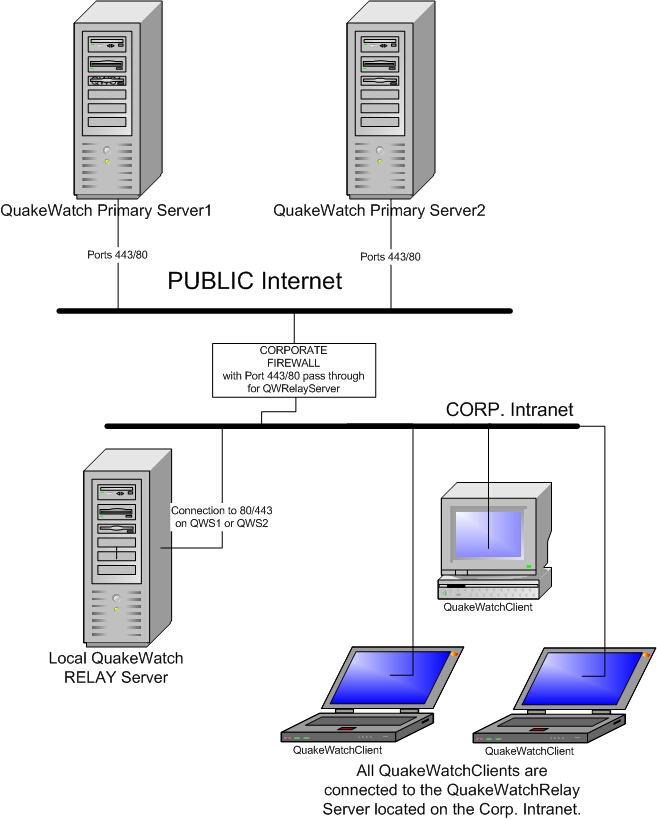
Troubleshooting
1. QWServer program terminates soon after
launching
- Make sure the Notification Service
(CORBA-event-channel) program (via 'startNotif' or 'runNotif.bat')
is also running.
- When using ports less than 1024,
special "root" or "administrator" privileges are usually required.
2. Clients are unable to connect to the
server
- Make sure the ports for the QWServer
(default 39977) and Notification Service (CORBA-event-channel)
(default 39988) are not blocked by a firewall. This can be
tested by running "telnet addr port" on a remote machine, where
"addr" is the address of the machine hosting the QuakeWatch servers
and "port" is one of the port-number values. If a server is
running at the specified port number and is not blocked then the
connection will succeed.
- Make sure the host name for the
machine running the QuakeWatch servers is operational on the client
machine. Running commands like "ping" or "telnet" on the
client machine can help determine this. If the host name will
not work but the IP address will, then running
the QuakeWatch servers via the "startAllNum"
script (Unix) or "runAllNum.bat" batch file (Windows)
may operate better (see the 'publishNumericIPFlag'
parameter description for more information).
- If the machine
running the QuakeWatch servers contains more than one network
interface ("multi-homed") then it may be necessary to specify the IP
address that the servers should use. For the QWServer, this is
configured via the 'serverHostAddress'
parameter.
To configure the Notification
Service (CORBA-event-channel) program to run at a specified host
address, the "-a=address" parameter is inserted into the launch
command for the program (i.e. 'java -Xms16m -Xmx256m -jar
ISTINotifServer.jar -g=1 -a="131.215.220.4" &').
3. Client connections fail with the
message "Unable to connect to server .. [host not found]"
If the clients' configured host
address is correct and the connections always fail with a "host not
found" error, the problem may be that QWServer machine has more than
one IP address, and the "wrong" IP address is being passed back to the
client. The "wrong" address may be an internal IP that cannot be
used outside of the local network subnet.
The default behavior of the QWServer is to
automatically determine the IP address of its hosting machine and to
use that IP address in "locator" resources that are passed back to the
client. A best-effort attempt is made to determine which IP
address to use when multiple IPs are available on a given
machine. If the "wrong" IP address is being selected, then the
solution is to explicitly provide the address in the server
configuration. To do this, put the following settings in the
"QWServerConfig.xml" file for the QWServer:
serverHostAddress = "address"
notifSvcHostAddress = "address"
The "address" is the host name or
IP address for the machine hosting the QWServer. In most cases
this will solve the problem. If it still doesn't work then it
may be necessary to also specify the host address in the "startNotif"
script (used to start up the notification-server event channel) by
making the applicable line look like this:
$JAVACMD
-Xms16m -Xmx256m -jar ISTINotifServer.jar -g=1 -a="address" $* &
If the problem still persists, it
may help to start up the servers with the "startAllNum" script/batch
file (instead of "startAll") to make the servers use numeric IPs
instead of host names.
QuakeWatch Server Login Information File
The QuakeWatch Server login information file
contains the username and password used to validate a connection to a
QuakeWatch Server. The password may be specified in plain text
(in which case the password will be replaced with an encrypted
version). Note: This file is used by the QWRelay feeder,
specified in its "QWFeederSettings" element via the 'loginInfoFileName' setting.
The first entry in the file is always the username:
username = "yourUser"
The second entry is the
password, which may be specified using one of the following:
password = "yourPwd"
stdEncPassword =
"yourStdEncPwd"
encryptedPassword = "yourEncyptedPwd"
The 'password' entry specifies the password in plain
text. The first time the login information file is used it will
be rewritten with the "password" entry replaced by an
'encryptedPassword' entry containing an encrypted version of the
password.
The 'stdEncPassword' entry specifies the
password in a "standard" encoded form (using Unix-style
"crypt"). The first time the login information file is used it
will be rewritten with the "stdEncPassword" entry replaced by an
'encryptedPassword' entry containing an encrypted version of the
"standard" encoded password.
The
'encryptedPassword' entry specifies the password in an "encrypted"
form.
If more than one type of password entry is
given, only one will be used, with the order of precedence as shown
above.
A sample login information file,
"test/TestLoginInfoFile.txt", is included with the QWServer
distribution. This file contains a username/password entry that
matches an entry in the "test/TestLocalPwdFile.txt" local-password
file for QWServer.
The following shows an example
of the contents of a login information file:
username = "yourUser"
password = "yourPwd"
Feeder-Data-Source Message Tracking
System
The "Feeder-Data-Source
Message Tracking System" is an algorithm that is used to assure that
all messages are delivered even when a client is switching between
QuakeWatch servers. The system requires that messages are
"tagged" with a unique feeder-data-source "host name" and message
number. The message numbers must be positive values that
increment sequentially. For messages entering the system via a
"QWCorbaFeeder", one of the "sendSourced..." methods should be
used. (These methods are defined in the "QWFeeder.idl" file.)
It is also possible to configure a
QWServer to have a "default" feeder-data-source "host name" value via
the 'defaultFdrSourceHost'
configuration parameter. When this parameter is used, any
received messages that do not already contain a
feeder-data-source-host-name value will be given the default value and
a feeder-data-source message number. The 'defaultFdrSourceHost'
parameter should only be used on QWServer installations that are
dedicated to a single data source.
The QW client maintains a table of
feeder-data-source host names and message numbers such that the
message number of the most recently received message from each data
source is known. (The feeder-data-source refers to the
originating data source for the message, not the QWServer that the
client is connected to).
When a client connects to a "new" QWServer (one that it was not
previously communicating with), the client sends the time-generated
value for its last-received message along with its table of
feeder-data-source host names and message numbers to the QWServer.
The QWServer scans its message
cache starting at a point in time that is eight hours before the
time-generated value supplied by the client. Each scanned
message is checked as follows:
1. If
the feeder-data-source for the message matches a feeder-data-source in
the client-supplied table and the feeder-data-source message number is
greater than the value in the table then the message is selected.
2. If the feeder-data-source message number is
not greater than the value in the table then the message is not
selected.
3. If the feeder-data-source
for the message does not match a feeder-data-source in the
client-supplied table then the message is only selected if its
time-generated value is greater than or equal to the client-supplied
time-generated value.
If
the time-generated time for a selected message is less than the
client-supplied time-generated value then the message time-generated
time is updated to the client-supplied value. (Otherwise the
client will reject the message.)
The QWServer then sends the selected messages
to the client.
Message Signing Implementation
The QuakeWatch Server
may be configured to use certificates and public/private keys to
"sign" all of its outgoing messages, allowing connected clients to
authenticate the messages. Below is a summary of terms and
algorithms for the implementation. See also the message-signing-related server configuration
parameters.
CA - Certificate Authority - The
software and people that build certificates and maintain the CoA and
CRL.
CoA - Certificate of Authority - The CA's
certificate (root certificate) which the CA uses to sign other
certificates and the CRL. Others use the CoA to ensure the
certificates and the CRL were signed from the CA.
CRL - Certificate Revocation List - The list of certificates that have
been revoked. This is maintained by CA and is updated as needed. The
CA signs the CRL using the CoA's private key.
Certificate - contains the user's public key and some information
about who they are. The CA signs the certificate using the CoA's
private key. Others use it to ensure the message was from the user.
Private/public key - The keys are created by a user and used
to obtain a certificate from the CA. The private key is used for
signing. The public key (which is contained in the certificate) is
used to verify the signature.
Signature - The
signature is a unique set of bytes that is used for authentication and
integrity assurance of digital data. It is derived from the private
key and digital data.
1. The CA provides the
following: a) Certificate of Authority (CoA) - stored as a URL. b)
Certificate Revocation List (CRL) - stored as a URL.
2. The QWServer provides to clients its own Certificate (stored only
as a file). This must match the server's private key.
3. The server puts a signature into "Signature" attribute of the
"QWMessage" element. To do this, the server uses its private key. (The
signature must match the server's certificate.)
4.
The client fetches the CoA and CRL from the CA (via URLs) and the
certificate from the server (via a request to the server.) It should:
a) Verify the CoA has not expired. b) Verify the CRL has not expired
(the update time is not after the current time and the next update
time if supplied is not before the current time) and is from the CA.
c) Verify the server's certificate has not expired, is from the CA and
is not on the CRL.
5. The client then verifies that
the message contains a signature that was signed by the server's
(valid) certificate. If the signature is not valid then the
client will reject the message.
The certificates
must be
X.509 certificates that are
DER-encoded and may be supplied in binary or
printable (Base64) encoding. If the certificate is provided in Base64
encoding, it must be bounded at the beginning by -----BEGIN CERTIFICATE-----, and
must be bounded at the end by -----END
CERTIFICATE-----.
The private key provided must be
in PKCS8 format either binary DER-encoded or in printable (Base64)
encoding. If the
private key
is provided in Base64 encoding, it must be
bounded at the beginning by -----BEGIN
PRIVATE KEY-----, and must be bounded at the end by -----END PRIVATE KEY-----.
Client / Server Connection Notes
For a CORBA-based
QuakeWatch server setup, the default configuration is for servers to
listen on ports 39977 and 39988 on the server-host machine. With
this configuration, a QuakeWatch client program (like CISN Display)
makes a connection to the server at port 39977, the server gives the
client the location of the Notification-Service event channel (which
is at port 39988), and the client then establishes a connection to the
event channel (at port 39988). Once that event-channel
connection is established, messages are "pushed" from the server event
channel out to the client program. (The client also does a
check-in with the server once per minute via the connection to server
port 39977.)
The "average"
client-machine firewall will not get in the way of these connections
because the connections are initiated by the client program (on the
client machine). More restrictive firewalls may prevent any
connection attempts that the firewall does not recognize or expect.
The QuakeWatch server can also be
operated in a web-services-based setup (which requires the
"QWWebServices" module and other additional libraries). For this
setup, the QuakeWatch server is accessed through a web server, using
the standard web port at 80 ("http") or 443 ("https"). The
messages are sent using the SOAP protocol standard (via the Apache
Axis implementation). A QuakeWatch client program (like CISN
Display) interacts with the QuakeWatch web-services server making
"http" or "https" requests to the associated web server, similar to
way that web pages are fetched by a web browser (like Internet
Explorer or Firefox). The QuakeWatch client polls the server
once every 10 seconds, asking if any new messages are available and
then receiving them if they are. (This type of connection is
inferior to the "push" connection that happens with the CORBA-based
server because there can be a bit of a delay in the messages and
because there is constant traffic on the connection even when there
are no messages available.)
The
web-services-based connection should be able to get through even the
more restrictive firewalls because all the client communications look
(to the firewall) the same as a web browser simply fetching web
pages. If the firewall will allow a web browser to access a web
page on the server machine hosting the QuakeWatch server, then we
expect that the firewall will allow the QuakeWatch client to access
the web-services-based QuakeWatch server. (This assumes that web
browser is not accessing the Internet through an proxy server.)
Web-services-based QuakeWatch servers can be
configured to
used encrypted communications so that all
traffic (including the sending of passwords) is protected. This
is normally done using
'https' protocol at port 443 (rather than 'http'
protocol at port 80).
One
good test of access to a web-services-based QuakeWatch server is to
use a web browser to try to access a page on an associated web
server. If the web-services-based QuakeWatch server is operating
on a machine with host name "test.server.com", a web browser on the
client machine is used to view the address
"http://test.server.com/axis".
The
browser may display one or two popup windows warning about the
validity of the certificate ("Yes" or "OK" is used to dismiss these
windows). If the server has been configured to require logins,
then a login window will appear, and a valid username/password entry
should be entered. A page titled "Apache Axis" should then
appear. If this happens, then the firewall is allowing web
access to the server and the web-services-based connection should work
OK.
(This assumes that web browser is not
accessing the Internet through an proxy server.)
If an error page appears then the
firewall is preventing even basic web surfing from happening, and the
server address may need to be added to a "safe" sites list.
Server Cache/Archive Notes
As messages come in to
the QWServer, they are added sequentially to the file-based
archive. A memory-based cache of received messages is also
maintained by the QWServer. The storage length of both the
archive and cache are configurable (see the 'maxArchiveAgeInDays' and 'maxCacheAgeInDays' configuration
parameters).
The primary purpose of
the archive is to support persistent storage of received messages so
that if a QWServer is stopped and restarted the previously-received
messages can be retrieved. The primary purpose of the cache is
to make previously-received messages readily available for clients to
request. When a QWServer starts up, it fills its message cache
by fetching messages from its file-based archive.
The file-based archive uses "flat" files
containing XML text, with one file for each day's worth of
messages. Old archive files are purged when all the messages in
a file are older than the 'maxArchiveAgeInDays'
value.
When a client requests "old"
(previously-received) messages, the QWServer first attempts to fetch
the messages from the cache. If the requested messages are not
found there (because they are too old), the QWServer attempts to fetch
them from the archive.
Note that if
the number of messages in the file-based archive is very large, it can
take a relatively-long time for the QWServer to fetch out requested
messages; possibly so long that the CORBA transaction times out.
As such, it is usually best to limit client-message requests to
messages held in the cache
. This can be enforced via the 'maxResendAgeInDays' value.
Message Format
Messages received and
sent by the QuakeWatch Server are in XML format. Files
documenting the QuakeWatch "QWmessage" format may be found in the "doc/xml" directory of the QuakeWatch Server
distribution, including the "QWmessage.dtd.txt"
file (which documents the format) and several example message files.
Example QuakeWatch Server Configuration
File
<QWServerConfig>
<Settings>
# ID
name string for this QuakeWatch server:
serverIdName =
"Test Server"
# Name
of console output redirect file:
consoleRedirectFileName = "log/QWServerConsole.txt"
# Name
of the log file:
serverLogFileName =
"log/QWServer.log"
# Level
of log messages sent to the log file:
serverLogFileLevel
= "Debug"
# Level
of log messages sent to the console:
serverConsoleLevel
= "Warning"
#
Maximum age for log files (days, 0=infinite):
logFilesMaxAgeInDays = 30
# Port
number spec for this server:
serverPortNum =
39977
# Port
# spec for notification service:
notifSvcPortNum =
39988
#
alternate server IDs list:
altServerIdsList =
""
# maximum message size (0 = no limit):
# maximumMessageSize = 65536
# true = use numberic IPs instead of
host names:
# publishNumericIPFlag =
false
</Settings>
<QWFeederMod
Name="QWRelay"
Class="com.isti.quakewatch.server.QWRelayFeeder"
LogFileName =
"log/QWRelayFeeder.log"
LogFileLevel
= "Debug"
ConsoleLevel
= "Warning">
<QWFeederSettings>
# host address of
server for QWRelay feeder:
serverHostAddress = "quakewatch1.cisn.org"
# port number of
server for QWRelay feeder:
serverPortNumber = 39977
# max event from
server age (days):
#
maxServerEventAgeDays = 3.0
# list of alternate
servers for fail-over reconnect:
alternateServersList = "quakewatch2.cisn.org:39977"
# true = enable
fail-over reconnect to alternate servers:
altServersEnabledFlag = true
# true = allow only
default alternate servers:
keepDefaultAltServersFlag = false
</QWFeederSettings>
</QWFeederMod>
</QWServerConfig>
Example Feeder-Modules Configuration File
<QWFeederConfig>
<QWFeederMod
Name="QWRelay_qws"
Class="com.isti.quakewatch.server.QWRelayFeeder"
LogFileName =
"log/QWRelayFeeder.log"
LogFileLevel
= "Debug"
ConsoleLevel
= "Warning">
<QWFeederSettings>
# host address of
server for QWRelay feeder:
serverHostAddress = "quakewatch1.cisn.org"
# port number of
server for QWRelay feeder:
serverPortNumber = 39977
# max event from
server age (days):
#
maxServerEventAgeDays = 3.0
# list of alternate
servers for fail-over reconnect:
alternateServersList = ""
# true = enable
fail-over reconnect to alternate servers:
altServersEnabledFlag = false
# true = allow only
default alternate servers:
keepDefaultAltServersFlag = false
</QWFeederSettings>
</QWFeederMod>
<QWFeederMod
Name = "QWViaFile"
Class =
"com.isti.quakewatch.server.QWViaFileFeeder"
LogFileName = "log/QWViaFileFeeder.log"
LogFileLevel = "Debug"
ConsoleLevel = "Warning">
<QWFeederSettings>
# input directory
pathname to poll for message files
inputDirName =
"viaFileData/msgInput"
# storage directory
pathname
storageDirName
= "viaFileData/msgSave"
# process directory
pathname
processDirName
= "viaFileData/msgProcess"
# delay between
polls of the input directory (ms)
inputPollDelayMS = 1000
# max time to keep
copies of the msg files (0 = no copies)
storageAgeSecs = 86400
</QWFeederSettings>
</QWFeederMod>
</QWFeederConfig>
Example Client-Versions-Information File
<ClientVersionsInfo>
<DistribName Name="QWClient_default">
<Versions NewVersionNum="1.01" MinConnNum="1.0"
/>
<NewerVersionMsg>
A newer version (v1.01) of this
program is available. It is recommended that you upgrade to
this version by pressing the "Upgrade" button. To keep using
the current version of the program, press the "Remind" button - you
will be reminded about this upgrade again later. Pressing the
"Website" button will display the distribution website - from there a
full reinstallation may be performed.
</NewerVersionMsg>
<NoConnVersionMsg>
This
client cannot connect to the server until the client program is
upgraded. Press the "Upgrade" button to upgrade this
program. Pressing the "Website" button will display the
distribution website - from there a full reinstallation may be
performed.
</NoConnVersionMsg>
<CurrentVersionMsg>
You are using the latest available
version of this program. If you would like reinstall the
program anyway, you may press the "Website" button to visit the
distribution website.
</CurrentVersionMsg>
<Links
DistZip="http://quakewatch1.cisn.org/qws/QWClient/QWClient_v1.01_dist.zip"
DistWebsite="http://quakewatch1.cisn.org/qws/QWClient" />
</DistribName>
<UnknownClientMsg>
No upgrades are available.
</UnknownClientMsg>
</ClientVersionsInfo>
Notes:
DistribName:
The client-distribution name reported by the client.
NewVersionNum: The version
number of the available client distribution.
MinConnNum: Optional
minimum-version number; connections from clients with lower version
numbers will be rejected.
QuakeWatch Messaging System Diagram
Revision History Notes
Version 2.0 [2019-8-14]
- Modified to
use the Product Distribution Layer (PDL) Indexer instead of Quake
Data Merge (QDM).
- Modified for Java 1.9
compatibility.
Version 1.141 [2013-11-15]
- Modified
checks to feeder input so only large changes in feeder-data-source
message numbers will result in warning-level log messages.
Version 1.14 [2013-09-24]
- Modified
product converter in PDL feeder so generated 'ProductLink' messages
will have 'Version' and 'Action' elements inside the 'ProductLink'
element (instead of the parent 'Event' element).
- Minor modifications to PDL-feeder
module.
Version 1.13 [2013-08-27]
Version 1.12 [2010-11-09]
- Modified
QWRelayFeeder to address issue where reconnect thread could get
'stuck'.
- Added checking and reporting of
status-error messages and time of last data message from feeders.
- Added reporting of time of last
data message sent.
- Modified to set system property
'java.awt.headless' to true.
Version 1.09 [2010-10-06]
- Improved
QWRelayFeeder reconnect-after-disconnect response.
- Modified QWRelayFeeder to log
connect-fail messages at debug level, and then at warning level
after two minutes with errors have elapsed.
Version 1.07 [2010-09-08]
- Modified
use of console-output file so a new one is created every 90 days
(default) and files older than 3 years (default) are automatically
deleted.
Version 1.06 [2010-08-23]
- Fixed
queuing/memory-usage issue with 'QWRelayFeeder' processing of cache
messages at startup.
Version 1.05 [2010-07-16]
- Improved
handling of messages containing characters greater than 127.
- Modified 'QWViaFileFeeder' to
always use UTF-8 charset when decoding input data.
- Modified to always reject
messages with duplicate feeder-data-source message numbers when
'checkDupFdrSourceFlag' is true (regardless of message payload).
Version 1.04 [2010-05-13]
- Created
'QddsQuakeMLFeeder' and 'CubeQuakeMLParser' for QuakeML
message-format support.
- Fixed issue where relay-feeder
messages with time-generated timestamp in future would result in
other messages not being stored in file archive.
Version 1.0 [2010-02-04]
- Modified
feeder CUBE-format parser to support location-method code 'Z' for
ANSS-EQ-XML 'Scope'=="Internal".
- Improved relay-feeder detection
and rejection of duplicate "recursive" messages when servers are
cross-connected.
Version 0.67Beta [2009-10-09]
- Fixed bug
in CUBE-format feeder-parser where version code on delete message
was ignored if message had no text comment.
- Modified QWCorbaOutputter to use
QWServer's "serverHostAddress" entry for outputter's CORBA ORB.
- Modified to make use of
"serverHostAddress" configuration parameter when
"qwServicesAvailFlag" parameter is 'false'.
- Modified QWCorbaFeeder to use
QWServer's "serverHostAddress" entry for feeder's CORBA ORB.
- Modified CorbaOutSubscriber to
make minor improvements to delivery-failure logic and log outputs.
Version 0.66Beta [2008-10-20]
- Added
QWCorbaOutputter configuration parameter 'subscribeAllDefaultFlag'
and changed default QWCorbaOutputter behavior to deliver no messages
if no domain/channels are subscribed to.
Version 0.65Beta [2008-07-22]
- Added
"outputters" support and QWCorbaOutputter module.
- Modified QDDS feeder to log "Not
enough characters in message" error at "debug" level instead of
"warning" level.
- Added averaging to
excessive-thread-count detection.
- Added slight delay between
tracked-log-message trigger and status report output (to allow
multiple "simultaneous" messages to be included in the same report).
- Modified CUBE-format parser to
handle numeric strings that have whitespace before a plus sign.
- Added 'CubeToAnssEQXML' and
'CubeToQWXML' test utilities.
- Using updated QWCommon
(client-side communications layer) modified to release more CORBA
resources when closing connection.
Version 0.64Beta [2008-03-25]
- Added
status report configuration parameters and implementation.
- Added QWServices methods
'getStatusReportTime()' and 'getStatusReportData()'.
- Modified clients manager to allow
recovery of username when client connection has timed out but client
then reuses connection.
Version 0.62Beta [2007-09-21]
- Modified processing of incoming
message-elements so that whitespace between elements is removed and
control characters within elements are encoded to "&##;"
strings.
- Fixed bugs in CUBE-message parser
where incomplete CUBE-field items could result in
'StringIndexOutOfBoundsException' being thrown.
Version 0.6Beta [2007-08-15]
- Added support for the dynamic
feeder-modules configuration file (via the new
'feederModulesCfgFile' configuration parameter).
- Fixed issue with
'QWViaFileFeeder' where input files that failed parsing could get
stuck in the 'process' directory and be processed again and again.
- Modified to wait for feeder stops
to complete before exiting program.
- Modified to check for
'MsgSrc'/'MsgIdent' values in ANSS-EQ-XML-format messages (if
enabled via new 'checkEQMsgIdentFlag' configuration parameter).
- Minor improvement to
CUBE-to-ANSS-EQ-XML-format message parsing (added "CUBE_Code"
comments).
- Modified 'CubeAnssEQParser' and
'CubeFormatParser' classes to detect and pass through XML-format
messages and to allow spaces in date codes.
- Added 'memorySizeWarnMBytes',
'threadCountWarnMargin', 'notifSvrStatusLogName' and
'notifSvrStatusWarnFlag' configuration parameters.
- Updated OpenORB libraries (to
"20061129_isti3" version).
Version 0.59Beta [2006-09-20]
- Modified to recognize ShakeMap
product-translation codes for Global and for ShakeMaps from other
networks.
- Updated OpenORB libraries (to
"20060309_isti1" version).
- Fixed issue where next "alive"
message output by server could be delayed if "alive" message
requested by a client.
- Added 'QddsAnssEQ' feeder and
support for "feederParserClass" configuration setting for
'QWViaFile' and 'QWCorba' feeders.
- Fixed issue where client-versions
update information would remain invalid after versions-info file was
inaccessible and then accessible.
- Modified to update the
client-versions update information even if the last-modified time
for the client-versions-information file is older than the one
currently held.
- Added configuration parameters
'msgKeyElement1Name' and 'msgKeyElement2Name'.
Version 0.58Beta [2005-12-14]
- Updated to include QuakeWatch Web
Services enhancements.
Version 0.57Beta [2005-09-16]
- Fixed bug (introduced in version
0.55Beta) where updated client-versions-information was not detected
by a client unless the client was restarted.
- Modified to always generate
clients-info log file (instead of only when CORBA QWServices were in
use).
Version 0.56Beta [2005-07-13]
- Modified cached-archive code to
avoid thread 'interrupt()' calls that can be problematic under
Solaris OS.
Version 0.55Beta [2005-06-08]
- Modified processing of
client-versions-info file to use separate thread and timeout to
prevent possibility of client update not being offered because of
indefinite file I/O access thread block.
Version 0.54Beta [2005-04-29]
- Modified to properly recognize
duplicate messages when data-message element of incoming message
contains no child elements.
- Modified to use
feeder-data-source host name and message number to differentiate
between received messages.
- Fixed 'QWRelayFeeder' processing
of feeder-data-source host name and message number values.
- Added "Notification Service /
CORBA-Event-Channel" and "QuakeWatch Messaging System Diagram"
sections to manual.
Version 0.52Beta [2005-04-13]
- Fixed so as to actually discard
messages whose source is the feeder's own server.
- Modified to prevent extraneous
"Error parsing 'SrcHostMsgID'" messages.
- Fixed processing of "-configFile"
parameter when followed by an equals sign.
- Put XML doc and revision history
into QWServer manual.
Version 0.5Beta [2005-02-10]
- Added server-statistics log
output.
- Added 'clientVInfoPollDelaySecs'
configuration item.
- Added support for requesting
messages via feeder-data-source information.
Version 0.48Beta [2004-12-03]
- Added
clients-information-tracking log file.
- Added support for redirection of
clients to other servers.
- Added login-information file
option to QWRelay feeder module.
- Modified to prevent
'QWRelayFeeder' from being able to connect to its own QWServer.
- Added 'maximumMessageSize'
configuration parameter.
- Added 'publishNumericIPFlag'
configuration parameter.
- Added 'allowObsLoginClientsFlag'
configuration parameter.
- Changed to improved start/stop
launching scripts.
- Added command-line parameter
"--configFile" for specifying the configuration file.
- Added "QuakeWatch Server
Administrators Manual".
- Added troubleshooting section to
manual.
- Updated OpenORB to version
"1.4.0_17Nov2004" (for Java 1.5 support).
- Updated QDDS to version "1.3.3
Level 2004.11.08".
Version 0.47Beta
- Implemented validation of client
login username and password.
Version 0.45Beta
- Added 'allowDuplicatesFlag'
configuration parameter.
- Added "units" attributes to event
messages received via QDDS.
- Updated to QDDS 1.3.2 Level
2004.09.18.
Version 0.43Beta
- Implemented 'QWRelay' and
'QWViaFile' feeder modules.
Version 0.32Beta
- Added support event history
persistence via cached archive.
- Added support for
alternate-servers list and client-services method.
- Added support for "Quarry"
attribute in event messages.
Version 0.25Beta
- Implemented support for
resend-requests of messages to clients.
- Added support for the QDDS
"Trump" event message-type.
- Improved to perform proper
cleanup of resources when shut down.
- Improved internal message
handling.
- Added and implemented a new
QuakeWatch client/server service method for fetching the server name
(defined in the server's configuration file).
Version 0.24Beta
- Initial version of
client-to-server login implemented.
- Memory cache of event-messages
implemented.
- Log-file management improved (new
log file each day; older log files automatically deleted).
- New separate log file that tracks
connections to the CORBA-event-channel.
Version 0.23Beta
- Communications improvements made
that allow clients to run behind a firewall/NATs without any custom
configurations.
Version 0.22Beta
- Fixed QWServer console output
problem.
- Updates and improvements to QDDS
code.
- Added periodic log of memory
usage in QWServer and OpenORB Notification Service (event channel).
Version 0.21Beta
- Implemented patches to OpenORB to
fix resource leaks.
- Implemented patch to OpenORB to
fix possible null-pointer exception error.
- Implemented improvements to
OpenORB Notification Service (event channel) launching program.
Version 0.20Beta
- CORBA messaging package changed
from ORBacus to OpenORB.
Version 0.11Beta
- Upgraded version of ORBacus in
use for CORBA communications.
Version 0.10Beta
- The server can receive event
messages via QDDS, translate them to XML and send them into a
CORBA-event-channel.
See Also
CISN Display Installation at http://www.cisn.org/software/cisndisplay.html
8/26/2019 - Kevin Frechette, Instrumental Software Technologies, Inc.
- info@isti.com